
zcal Review 2026: Pricing, Pros, Cons and Alternatives
What zcal's Free, Pro and Business plans include, what one host and a five-person team pay against Calendly, Cal.com and SavvyCal, and when the free tier's payment commission makes Pro the cheaper plan.

zcal is worth it in 2026 for anyone who wants a free scheduling link without Calendly's one-event-type cap: the Free plan costs nothing and has unlimited links and calendars. The cheapest paid plan is Pro at $7 per user a month billed annually, per zcal's pricing page read on November 10, 2026.
For one user, Pro costs $84 a year against $120 for Calendly Standard. For a team of five sharing round robin events, Pro costs $420 a year and Calendly Teams $960. Stay on Free unless you need a team, SMS reminders, unbranded pages or you take enough Stripe payments for the 3% fee to cost more than Pro.
Key factsBest for: Solo users who want unlimited free booking links and polls…
- A scheduling tool whose free plan keeps unlimited links, calendars, polls and Stripe payments.
- Free plan: zcal Free has no time limit and includes unlimited links, unlimited calendar accounts and meeting polls.
- Paid plans: Pro and Business are priced per user, and monthly billing costs half as much again as annual billing.
- Payment fee: Stripe bookings taken on the Free plan carry a zcal commission, which both paid plans remove.
- Techpresso data: 55% of the 116 meeting scheduling tools Toolradar tracks are free, freemium or open source, as of November 10, 2026.
Pros
- Free plan has unlimited links and calendar accounts, with no time limit.
- Pro team of five costs $420 a year against $960 on Calendly Teams.
- Meeting polls and Zapier work on the Free plan.
Cons
- Stripe payments on Free carry a 3% zcal fee.
- Pro's 750 SMS credits cover about 75 US texts a month.
- No refunds once the 14-day trial ends.
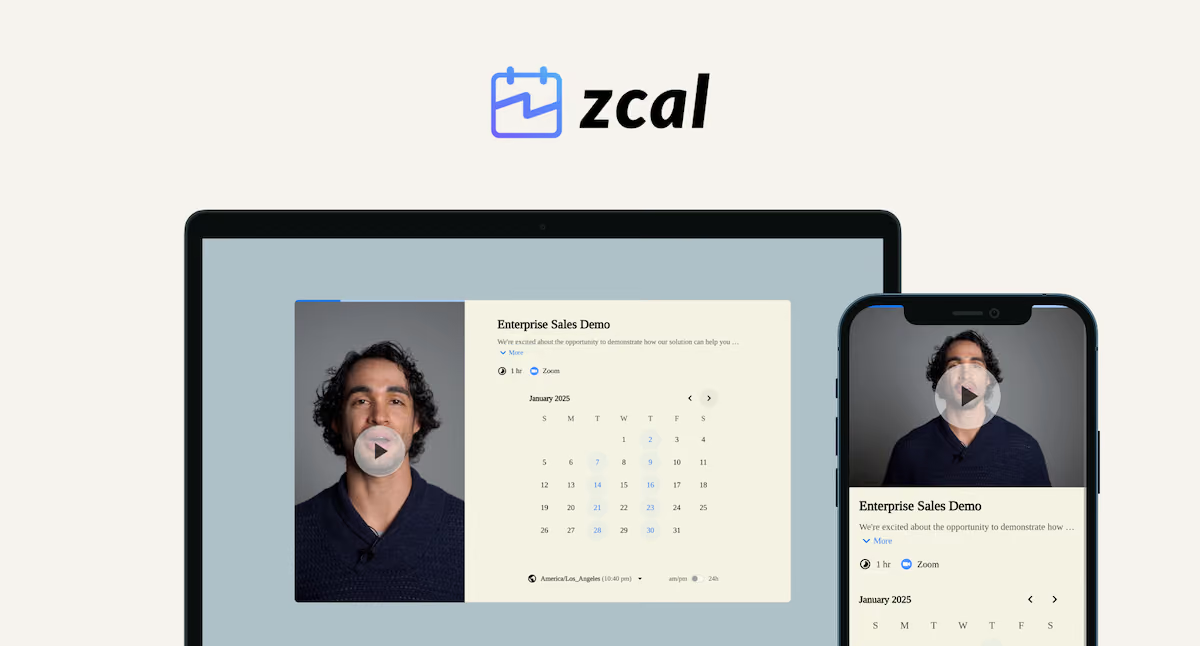
zcal's pitch is blunt: its pricing page claims that 99% of its features sit on the free plan. That is close enough to true for a solo user, because the free tier keeps unlimited links, every calendar connection, meeting polls and Stripe payments, which are the exact items Calendly puts behind a paid seat. What you pay for is teamwork, reminders by text and your own branding.
Techpresso data: of the 116 meeting scheduling tools listed on Toolradar, our software directory, 55% are free, freemium or open source as of November 10, 2026 (Toolradar meeting scheduling ranking). A free scheduler is common, then; a free one with no cap on links or calendars is the rarer part, and that is where zcal competes. Techpresso's 820,000+ readers get changes like these to software prices in the daily newsletter.
Methodology: for this review we read zcal's pricing page, its plan comparison table, its pricing FAQ and its help center plan pages, plus the pricing pages of Calendly, Cal.com, SavvyCal and TidyCal, all on November 10, 2026. Team and multi-year totals are our arithmetic on printed prices. No zcal account was opened for this review, so nothing here describes using the product.
What is zcal?
zcal is a scheduling tool that gives you booking links, meeting polls, group events and sign-up sheets, all synced to Google, Outlook or Apple calendars. Bookers pick a slot, zcal checks every connected calendar for conflicts, and the invite lands with a Zoom, Google Meet or Microsoft Teams link attached.
The free plan is the product, not a trial. It includes unlimited links, unlimited calendar accounts, meeting polls, automated email reminders, group events, multiple durations and locations, custom questions, cover photos, website embedding, Stripe payments and Zapier, with no ads.
The limits are specific: group events cap at 5 people per time slot, you get one welcome video, and there are no teams, SMS reminders or follow-up emails.
That makes zcal closer to Cal.com's free tier than to Calendly's, which stops at one event type and one calendar.
To see where zcal sits among all booking tools, open our ranking of appointment scheduling software, and the best AI scheduling apps page covers tools that plan your calendar for you.
How zcal works
You sign up free, connect your calendars and create links. Each link can offer several durations and locations, ask custom questions and take payment through your own Stripe account. Meeting polls work like a Doodle vote: you propose times, invitees mark the ones that suit them, and you book the winner.
Teams change the billing, so read this before inviting anyone. zcal bills per user, and when you invite people to a team, their accounts are upgraded to your plan and added to your seat count. The team owner manages billing, and a seat added mid-cycle is charged pro rata until the next cycle.
Round robin events spread bookings across team members by availability; collective events find a time when every chosen member is free.
SMS reminders run on credits, not texts. Pro includes 750 credits per user each month and Business 1,500; a text to the US or Canada uses 10 credits, so Pro covers about 75 texts a month, and texts abroad use more. Unused credits expire at the end of the month.
Paid plans start with a 14-day free trial, and if you cancel later you keep the plan until the billing period ends, then drop to Free.
zcal key features
zcal pricing
zcal's pricing page, read on November 10, 2026, opens on annual billing. Free costs nothing. Pro is $7 and Business $12 per user a month billed annually; switching the toggle to monthly billing shows $10.50 and $18. Annual billing is a third cheaper than monthly on both plans, by our arithmetic. Both paid plans carry a 14-day free trial, and zcal states it does not give refunds after that.
The page also prints its own one-user and five-user comparison against Calendly, and we checked each rival figure on that vendor's own page. Calendly Standard is $10 and Teams $16 per seat a month billed yearly in its structured pricing data, while its pricing cards now lead with Standard Plus at $18 and Teams Plus at $24, which bundle its Notetaker. Cal.com is free for one user, with Teams priced per user. SavvyCal has no free booking plan, but its Basic tier already includes round robin.
| Tool and plan | 1 user | Team of 5 |
|---|---|---|
| zcal Free | $0 | No team features |
| zcal Pro | $84 | $420 |
| zcal Business | $144 | $720 |
| Calendly Standard / Teams | $120 (Standard) | $960 (Teams) |
| Cal.com Free / Teams | $0 (Free) | $720 (Teams) |
| SavvyCal Basic | $120 | $600 |
A five-person team saves $540 a year on zcal Pro against Calendly Teams, and $180 against SavvyCal Basic, by our arithmetic. On monthly billing the same zcal Pro team costs $630 a year. The hidden cost sits on the free tier: Stripe payments there carry a 3% zcal fee on top of Stripe's own charges. Pro on annual billing pays for itself once you take more than $2,800 a year in paid bookings, or $4,200 on monthly billing, both our arithmetic. A tutor taking $300 a month through zcal already crosses that line.
| Plan | Price | Best for |
|---|---|---|
| zcal Free Forever | $0 | Unlimited links and calendars, meeting polls, group events up to 5 per slot, Stripe payments with a 3% fee |
| zcal Pro | $7/user/mo yearly ($10.50 monthly) | One team, round robin and collective events, 750 SMS credits a month, no branding, no payment fee, webhooks |
| zcal Business | $12/user/mo yearly ($18 monthly) | Everything in Pro plus custom domains, custom email domains, unlimited teams and 1,500 SMS credits |
| Calendly Standard | $10/seat/mo billed yearly | Single-host plan: any number of event types, several calendars, Stripe and PayPal, but no round robin |
| Calendly Teams | $16/seat/mo billed yearly | Round robin, lead routing, centrally managed event types and Salesforce sync |
| Cal.com Teams | $12/user/mo billed yearly | One team with shared availability, round robin, routing forms and Cal.com branding removed |
| SavvyCal Basic | $120/user/yr; $144 on monthly billing | Unlimited links and calendars, round robin and collective links, workflows and the API |
zcal pros and cons
What we like
- Free plan has unlimited links and calendar accounts, with no time limit.
- Pro team of five costs $420 a year against $960 on Calendly Teams.
- Meeting polls and Zapier work on the Free plan.
What could be better
- Stripe payments on Free carry a 3% zcal fee.
- Pro's 750 SMS credits cover about 75 US texts a month.
- No refunds once the 14-day trial ends.
Who zcal is for
zcal fits a freelancer, tutor, recruiter or consultant who needs several booking links and polls and does not want to pay for them. The free tier covers that whole job, including calendar checks across a work and a personal account. Small teams that want round robin at the lowest per-seat price on this page also fit, since Pro undercuts Calendly Teams by more than half.
Skip it in three cases. Sales teams that need routing forms and CRM handoff are better served by Calendly Teams or Cal.com Teams, and you can see how those two differ in our Calendly and Cal.com comparison or in our Cal.com write-up. Coaches who take regular payments and want to pay once should look at TidyCal Lifetime in our TidyCal review. And anyone who wants SSO or a compliance badge should look elsewhere, since zcal's pricing page lists neither. zcal's own profile, with its alternatives, is on Toolradar.
Best zcal alternatives
If zcal is not the right fit, these are the closest options.
| Tool | Best for | Starts at | |
|---|---|---|---|
| zcal | Solo users who want unlimited free booking links and polls, and small teams wanting cheap round robin. | Free plan · Pro $7/mo per user on the annual plan · Business $12/mo pe | Visit → |
| Calendly | Sales teams that need lead routing and Salesforce handoff, and invitees who know Calendly links. | Free plan · Standard $10/mo per seat · Teams $16/mo per seat · custom- | Visit → |
| Cal.com | Solo users who want a free link with CRM sync, and teams that need routing forms. | Free plan · Teams $12/mo per user · Organizations $28/mo per user · cu | Visit → |
| SavvyCal | Consultants whose guests like to see their own calendar laid over the host's free slots. | Free plan · Basic $10/mo per user on the annual plan · Premium $17/mo | Visit → |
| TidyCal | Solo coaches who sell sessions and would rather pay once than every year. | Pro $8.25/mo on the annual plan · custom-priced plans too | Visit → |


The bottom line
zcal is worth it, and for most solo users the right plan is Free. Unlimited links, calendars and polls at no cost puts its free tier level with Cal.com's at the top of this page, well ahead of Calendly Free. Upgrade to Pro on annual billing when you add a team, need text reminders or take more than about $2,800 a year through Stripe. Choose Calendly or Cal.com Teams instead if your bookings must route through a CRM.
Weighing zcal against the market leader? Start with how SavvyCal stacks up against Calendly, then read what each Calendly plan costs, our full review of Calendly and the wider list of tools that replace Calendly. Service businesses can compare Calendly with Acuity Scheduling or open our Acuity review. Toolradar profiles: Calendly, Cal.com and SavvyCal.
Sources, all read November 10, 2026: zcal, zcal's help center, Calendly, Cal.com, SavvyCal and TidyCal. Team totals and break-even figures are our arithmetic. Want the next scheduler price change in your inbox? Get Techpresso free.
Cite this: Techpresso, "zcal Review 2026: Pricing, Pros, Cons and Alternatives", November 2026.
Frequently asked questions
Is zcal worth it in 2026?
How much does zcal cost?
Is zcal really free?
zcal vs Calendly: which is cheaper?
Does zcal refund annual plans?
Sources
Prices and plan details come from each vendor's own pricing page, re-checked by the Toolradar pricing tracker.
- Calendly pricingchecked Sep 2026
- Cal.com pricingchecked Sep 2026
- SavvyCal pricingchecked Sep 2026
Some offers on this page may be paid placements or contain affiliate links.
Get the Techpresso brief
Free daily newsletter, read in 5 minutes.
Subscribe free