
Xodo PDF Review 2026: Pricing, Pros, Cons and Alternatives
Xodo Web, Xodo Desktop (PDF Studio) and the Document Suite on yearly billing, the perpetual license, the free daily allowance, and the cost next to Acrobat, Foxit, iLovePDF and PDFgear.

Xodo is worth it in 2026 for someone who wants a full desktop PDF editor for about half of Acrobat's price: Xodo Desktop (PDF Studio) costs $9.99 a month billed yearly, $119.88 a year, against $239.88 for Acrobat Pro on its annual prepaid plan. Xodo Web, the browser toolset, is $7.99 a month billed yearly, and the Document Suite bundles web, desktop and mobile for $14.99 a month billed yearly.
Skip the subscription if you only merge or sign a few files a month: the free allowance is one action a day, and PDFgear is free. Buy the $240 perpetual desktop license if you will use it for two years or more. Prices read on each vendor's pricing page on 9 November 2026.
Key factsBest for: Freelancers and small teams who want an offline PDF editor…
- Browser tools, an offline desktop editor and mobile apps, sold separately or as one suite, with a perpetual desktop option.
- Cheapest paid plan: Xodo Web, billed yearly
- Desktop editor: PDF Studio, about half of Acrobat Pro's yearly price
- Perpetual desktop license: One payment, up to two devices
- Free use: 1 action a day on Xodo Web
Pros
- PDF Studio runs offline on Windows, macOS and Linux with 60+ tools.
- Desktop on yearly billing costs about half of Acrobat Pro.
- A perpetual license covers two devices with 12 months of upgrades.
Cons
- No refunds, and the free trial lasts 3 days and needs a card.
- The free tier allows only one action a day.
- Xodo Web costs more a year than iLovePDF Premium.
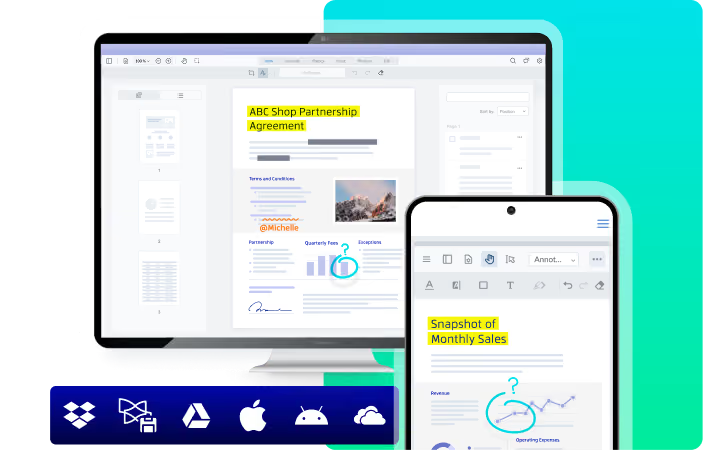
Xodo's value is in the desktop app, not the web tools. The browser toolset competes with cheaper web services, but PDF Studio is a full offline editor for Windows, macOS and Linux, and it costs half of what Adobe charges for Acrobat Pro. Linux support alone rules it in for some technical teams.
Toolradar data: on Toolradar's Adobe Acrobat page, run by the team behind Techpresso, Acrobat's head-to-head comparison pages drew 157 visits in the last 30 days as of November 2026, ranking #1 of 23 e-signature tools by compare-page visits. Buyers shop against Acrobat first, which is exactly the comparison Xodo is priced to win.
Methodology: we read Xodo's pricing page and its PDF Studio page, then the pricing pages of Adobe Acrobat, Foxit, iLovePDF and PDFgear on 9 November 2026. Yearly and multi-year totals are our arithmetic on those printed prices. Techpresso runs no test lab, so nothing below comes from hands-on use.
What is Xodo?
Xodo is a PDF product line built on Apryse's document processing technology. It comes in three parts: Xodo Web, a set of 40+ browser tools; Xodo Desktop, sold as PDF Studio, with 60+ professional tools that work offline; and Xodo Mobile apps for Android and iOS that edit, annotate, sign and share documents.
The tool list is broad for the price. Xodo's comparison of its plans covers editing, compressing, annotating and redacting PDFs, merging and splitting, converting to and from PDF, OCR on scans, side-by-side PDF comparison, DOCX editing without Word, AI summaries through AskPDF, passwords and sanitizing, and automation of repetitive tasks.
On privacy, Xodo says most tools process files locally on your device, and files that do need an upload are permanently deleted after one hour. That matters for anyone handling contracts or client records who would rather not leave copies on a web service.
How Xodo works
Everyone gets one free action per day on Xodo Web, with limited access to the tools. To evaluate more, you can start a 3-day free trial that requires a valid payment method, download the free Xodo PDF Reader, or try a demo of PDF Studio on Windows, macOS or Linux.
Paid plans renew until you cancel from the Subscription menu, and you keep access until the end of the period. Xodo does not offer refunds, so a three-day trial is short for a yearly commitment: run your real tasks, such as OCR on a scanned contract or a redaction, before the trial ends.
The perpetual license is the unusual option. It is a one-time PDF Studio purchase with no subscription, 12 months of free version upgrades and use on up to two devices, and Xodo also sells it with one, two or three-year support periods. After the upgrade window you keep the version you have.
Xodo key features
Xodo pricing
Three plans, all quoted on yearly billing. Xodo Web is $7.99 a month, billed $95.88 a year. Xodo Desktop (PDF Studio) is $9.99 a month, billed $119.88 a year, or $19.99 a month on monthly billing, so prepaying saves $120 a year. The Document Suite, which bundles web, desktop and mobile with priority support, lists at $14.99 a month billed yearly. Prices come from Xodo's pricing page and its PDF Studio page, read on 9 November 2026.
Promotion, not list price: the pricing page also shows the Suite at $8.99 a month, billed $107.93 a year, under a 40% lifetime discount whose footnote dates the offer to 31 October 2026 for new annual subscriptions. If checkout still applies it, the Suite becomes cheaper than Xodo Desktop alone; if not, budget the list price.
Perpetual vs subscription, in our arithmetic: the $240 perpetual license equals almost exactly two years of Xodo Desktop on yearly billing. Over three years, the subscription costs $359.64 and keeps you on the latest version; the perpetual license stays at its one-time price but includes upgrades for the first 12 months only.
Against rivals on yearly billing: Adobe charges $179.88 a year for Acrobat Standard and $239.88 for Acrobat Pro, and Foxit PDF Editor+ is $159.99 per user a year. Xodo Desktop undercuts all three. For browser-only work, iLovePDF Premium is $60 a year, below Xodo Web, and PDFgear is free on desktop and mobile without an account.
Teams: Xodo discounts Suite seats by 5% for 2 to 5 users, 10% for 6 to 20 and 15% for 21 or more, and PDF Studio discounts start at 26 seats.
| Plan | Price | Best for |
|---|---|---|
| Xodo Free | $0 | 1 action a day with limited access to Xodo Web tools |
| Xodo Web | $7.99/mo billed yearly ($95.88/yr) | 40+ online tools, unlimited document downloads, works in any browser |
| Xodo Desktop (PDF Studio) | $19.99/mo, or $9.99/mo billed yearly ($119.88/yr) | 60+ professional tools, offline, Windows, macOS and Linux |
| PDF Studio perpetual | $240 once per user | No subscription, 12 months of free upgrades, up to two devices |
| Xodo Document Suite | $14.99/mo billed yearly (list) | Web, desktop and mobile apps in one subscription, priority support |
| Xodo Document Suite offer | $8.99/mo, billed $107.93/yr | 40% lifetime discount; footnote dates the offer to Oct 31, 2026 |
| Adobe Acrobat Standard | $14.99/mo annual billed monthly, or $179.88/yr | Essential PDF editing and conversion |
| Adobe Acrobat Pro | $19.99/mo annual billed monthly, or $239.88/yr | Full PDF toolset with e-signature workflows |
| Adobe Acrobat Studio | $24.99/mo annual billed monthly, or $299.88/yr | Everything in Acrobat Pro plus AI Assistant |
| Foxit PDF Editor+ | $159.99 per user/yr | Desktop, web and mobile apps, Smart Redact, 150 eSign envelopes a year |
| iLovePDF Premium | $5/mo billed annually ($60/yr) | Full access to all iLovePDF tools |
| PDFgear | Free | Read, edit, convert, merge and sign PDFs without signing up |
Xodo pros and cons
What we like
- PDF Studio runs offline on Windows, macOS and Linux with 60+ tools.
- Desktop on yearly billing costs about half of Acrobat Pro.
- A perpetual license covers two devices with 12 months of upgrades.
What could be better
- No refunds, and the free trial lasts 3 days and needs a card.
- The free tier allows only one action a day.
- Xodo Web costs more a year than iLovePDF Premium.
Who Xodo is for
Xodo fits a freelancer, small office or technical team that needs a real offline PDF editor and does not want to pay Acrobat prices. It also runs on Linux, and the perpetual license suits anyone who dislikes subscriptions and can live with the version they buy after the first year of upgrades.
Skip the paid plans if your PDF work is occasional: one free action a day covers a quick merge, and our PDFgear review and free PDF editors guide cover free desktop options. Skip Xodo too if your company standardizes on Adobe's e-signature workflows; the Adobe Acrobat review and Acrobat pricing guide explain what that costs.
For browser-only work on a tight budget, compare the iLovePDF review first, since its yearly plan costs less than Xodo Web. Subscribe to Techpresso for the daily brief on the tools and AI products worth your time.
Best Xodo alternatives
If Xodo is not the right fit, these are the closest options.
| Tool | Best for | Starts at | |
|---|---|---|---|
| Xodo | Freelancers and small teams who want an offline PDF editor on Windows, macOS or Linux for less than Acrobat. | Free (1 action a day) | Visit → |
| Adobe Acrobat | Companies that rely on Adobe's e-signature workflows and need the format's reference editor. | Standard $179.88/yr | Visit → |
| Foxit PDF Editor | Teams that want an Acrobat-style ribbon interface with e-signing and document management included. | PDF Editor+ $159.99 per user/yr | Visit → |
| iLovePDF | People who do quick conversions, merges and compressions in the browser. | Free plan · Premium $5/mo per user · custom-priced plans too | Visit → |
| PDFgear | Anyone who needs to read, edit, convert, merge and sign PDFs without paying. | Free on Windows, Mac, iPhone, iPad and Android | Visit → |



The bottom line
Buy Xodo Desktop (PDF Studio) on yearly billing if you want a full offline editor at about half of Acrobat Pro's price, and choose the perpetual license if you will keep it two years or more. Take the Document Suite only if you work across browser, desktop and phone, and check at checkout whether the discount banner still applies.
Pick Adobe Acrobat for e-signature workflows, Foxit for a team editor with document management, iLovePDF for cheap browser tools and PDFgear for free editing. Our best PDF editors ranking, Foxit review and Acrobat vs Foxit comparison cover the rest of the field.
Cite this: Techpresso, "Xodo PDF Review 2026: Pricing, Pros, Cons and Alternatives", November 2026.
Frequently asked questions
Is Xodo PDF worth it in 2026?
How much does Xodo cost?
Is Xodo free?
Xodo vs Adobe Acrobat: which is cheaper?
Should I buy the Xodo perpetual license?
Some offers on this page may be paid placements or contain affiliate links.
Get the Techpresso brief
Free daily newsletter, read in 5 minutes.
Subscribe free