
Teamwork.com Review 2026: Pricing, Pros, Cons and Alternatives
Teamwork.com's Free, Basics and Accelerate plans for client work, which features wait for the quote-only tiers, a 10-person agency cost model, and how monday.com, Asana and ClickUp compare per seat.

Teamwork.com is worth it in 2026 for an agency that wants timesheets, retainers and client invoices inside its project tool. That means Accelerate, at $24.99 per user a month billed yearly, and a 5-user minimum, per Teamwork's pricing page on November 10, 2026. Basics costs $9.99 per user a month billed yearly for at least 3 users and tracks billable time, but has no timesheets or invoicing.
For a 10-person team, Accelerate comes to $2,998.80 a year by our arithmetic. Timesheet approval and profit reporting by client sit on Optimize, which is quote-only, so agencies that need those should price a demo before they commit.
Key factsBest for: Agencies and consultancies that bill time and want…
- A client-work project platform with timesheets, retainers and invoicing on Accelerate and profitability on Optimize.
- Free plan: Teamwork.com's Free plan allows up to 5 users and 5 projects, with time logging and 100MB of storage.
- Seat minimums: Basics needs at least 3 users and Accelerate at least 5, per the plan comparison table.
- Quote-only features: Timesheet approval, profitability by client and fixed-fee budgets start on Optimize, which has no public price.
- Toolradar data: 46% of the 383 project management tools Toolradar tracks are free, freemium or open source, as of November 2026.
Pros
- Accelerate builds client invoices from logged time and tracks retainers.
- The Free plan allows 5 users and 5 projects with time logging.
- Clients can be invited into projects from Basics.
Cons
- Timesheet approval and client profitability need the quote-only Optimize plan.
- Seat minimums of 3 on Basics and 5 on Accelerate.
- Basics has no timesheets or invoices despite tracking billable time.
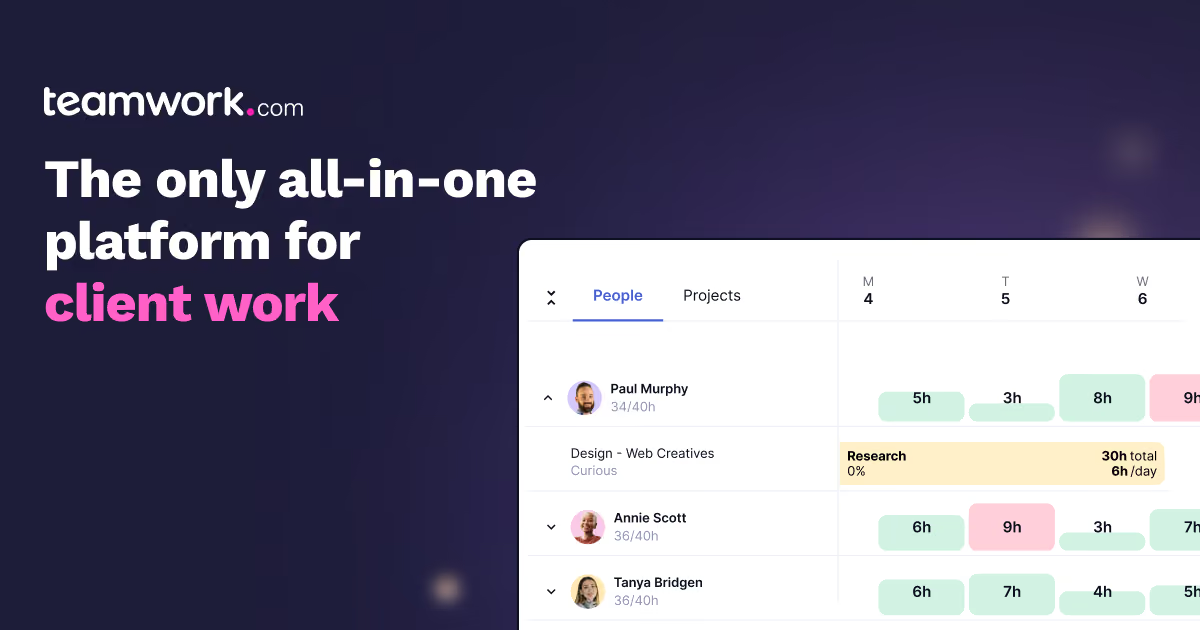
Teamwork.com pitches itself as the platform for client work: projects organized by client, billable time, budgets and retainers, and invoices built from logged hours. That focus is its edge over general work tools, and also why its plan ladder matters more than its headline price. Each step up unlocks a different piece of the agency workflow, and the pieces finance teams care about most are not on the self-serve plans.
Toolradar data: Toolradar, the software directory we run, tracks 383 project management tools, 46% of them free, freemium or open source. The median cheapest paid plan among the 178 that publish one is $19 a month, as of November 10, 2026 (Toolradar project management rankings). Teamwork's Basics plan sits well below that median per seat, while Accelerate costs more than the median before you add a single extra user. Toolradar keeps profiles for Teamwork.com, Asana and monday.com.
Methodology: on November 10, 2026 we read Teamwork's pricing page, including its full plan comparison table and FAQ, and the pricing pages of monday.com, Asana and ClickUp. Yearly totals are our arithmetic on printed per-user prices. Judgments here come from published plan terms.
What is Teamwork.com?
Teamwork.com is a project management platform built for teams that deliver work to clients: agencies, consultancies, IT services and professional services firms. Projects sit under clients, and every plan shows Gantt, table, list and board views, milestones, custom fields and client dashboards.
Where it departs from general tools is money. Time can be marked billable on every plan, Accelerate adds timesheets, time budgets, retainers, billable user rates and basic invoices built from logged time, and Optimize adds quotes, fixed-fee budgets, multi-currency budgets and profit by project or client.
In effect, the upper tiers turn the project tool into a light professional services automation (PSA) system, the category of software agencies use to run delivery and billing together.
TeamworkAI runs across the paid plans, with AI summaries and a task wizard from Basics and AI agents for resourcing and profitability higher up. The pricing page says AI is included in all paid plans for an introductory period and that usage-based AI credits are coming, so treat today's AI as a bonus whose cost may change.
How Teamwork.com works
A new account starts on a 14-day trial with no credit card, or on the Free plan, which caps the team at 5 users and 5 projects. Paid plans are priced per user, and the comparison table sets floors: Basics needs at least 3 users and Accelerate at least 5, so a two-person studio still pays for 3 seats.
Day to day, staff log time against tasks, mark it billable or not, and managers see it in dashboards. On Accelerate, time also flows into timesheets with logging reminders, counts against time budgets and retainers, and can be turned into an invoice; QuickBooks, Xero and HubSpot connect from the same tier.
Approving those timesheets is a separate step that the comparison table places on Optimize and Enterprise only.
Billing terms are spelled out in the pricing FAQ. Monthly plans can be cancelled at any time and stay active to the end of the period, while yearly plans are prepaid for the full term and can only be left at renewal.
Upgrades and added users apply at once, and downgrades or removed users take effect at the next billing date, so plan seat counts before renewal.
Teamwork.com key features
Teamwork.com pricing
Teamwork's pricing page, read on November 10, 2026, shows five plans. Free costs nothing for up to 5 users. Basics and Accelerate are priced per user per month on yearly billing, with the toggle advertising a 29% saving against monthly; check the monthly rate on Teamwork's site if you need to stay flexible. Optimize and Enterprise are quote-only, which matters because they hold most of the finance features.
The plan comparison table is where the real differences hide. Basics allows 300 projects and 100GB of storage; Accelerate raises that to 600 projects and 250GB and is the first plan with timesheets, invoicing and retainers. Optimize lifts projects to unlimited and adds timesheet approval, role-based and client rates, fixed-fee budgets and profit reporting. Single sign-on is Enterprise only.
To make the brief's question concrete, we priced a 10-person agency on yearly billing at each vendor's tier with native time tracking (for ClickUp, Business, its first plan with timesheets), then noted where formal timesheet approval starts. Every total is our arithmetic on printed per-seat prices, before tax and before any AI credit packs.
| Plan | 10 users, per year | Timesheet approval on this plan |
|---|---|---|
| Teamwork.com Basics | $1,198.80 | No (no timesheets) |
| Teamwork.com Accelerate | $2,998.80 | No, starts on Optimize (quote) |
| monday.com Pro | $2,280 | Not listed |
| Asana Advanced | $2,998.80 | Not listed |
| ClickUp Business | $2,040 | No, starts on Enterprise (quote) |
Accelerate ties Asana Advanced on price and costs about $720 a year more than monday.com Pro for 10 people, by our arithmetic. What the extra buys is billing: Accelerate is the only plan in this table whose pricing page lists invoices built from logged time and retainers. If your team bills hourly or on retainer, that can replace a separate billing tool; if it does not, monday.com or ClickUp cover time tracking for less. Rival prices come from monday.com pricing, Asana pricing and ClickUp pricing, read the same day; our project management pricing comparison covers more tools.
| Plan | Price | Best for |
|---|---|---|
| Teamwork.com Free | $0, up to 5 users | 5 projects, 100MB storage, 100 automations, time logging, Gantt and board views |
| Teamwork.com Basics | $9.99/user/mo billed yearly, min 3 users | 300 projects, 100GB, billable time tracking, client users, portfolio views, AI summaries |
| Teamwork.com Accelerate | $24.99/user/mo billed yearly, min 5 users | Timesheets, time budgets, retainers, basic invoices, workload planning, QuickBooks, Xero, HubSpot |
| Teamwork.com Optimize | Contact sales | Timesheet approval, quotes, fixed-fee and multi-currency budgets, profit by project or client |
| Teamwork.com Enterprise | Contact sales | Single sign-on, advanced access policies, dedicated infrastructure, success manager |
| monday.com Pro | $19/seat/mo billed yearly | Time tracking, private boards, 25,000 automation actions a month, 3-seat minimum |
| Asana Advanced | $24.99/user/mo billed yearly, $30.49 monthly | Native time tracking, approvals and proofing, capacity planning, unlimited free guests |
| ClickUp Business | $17/user/mo billed yearly, $25 monthly | Timesheets, advanced time tracking on trial, 10,000 automations a month |
Teamwork.com pros and cons
What we like
- Accelerate builds client invoices from logged time and tracks retainers.
- The Free plan allows 5 users and 5 projects with time logging.
- Clients can be invited into projects from Basics.
What could be better
- Timesheet approval and client profitability need the quote-only Optimize plan.
- Seat minimums of 3 on Basics and 5 on Accelerate.
- Basics has no timesheets or invoices despite tracking billable time.
Who Teamwork.com is for
Teamwork.com fits an agency or consultancy of roughly 5 to 50 people that bills by the hour or on retainer and wants delivery and billing data in one place. At that size Accelerate's per-seat price buys timesheets, budgets and invoices that general tools leave to a second app, and the client-first structure keeps work for each account together. Our project management for agencies ranking puts it next to the other agency-focused options.
Three kinds of team should look elsewhere. An in-house team with no clients to bill pays for features it will not use; Asana and monday.com cover internal projects well, and our Asana vs monday.com comparison helps choose. A two-person studio pays for a third seat on Basics and gets no invoicing, so the Free plan or a simpler tool such as ProofHub may fit better. And a firm that needs approved timesheets and client profitability from day one should ask for an Optimize quote before choosing, since those features are not on the self-serve plans.
Best Teamwork.com alternatives
If Teamwork.com is not the right fit, these are the closest options.
| Tool | Best for | Starts at | |
|---|---|---|---|
| Teamwork.com | Agencies and consultancies that bill time and want projects, retainers and invoices in one tool. | Free plan · Basics $9.99/mo per user on the annual plan · Accelerate $ | Visit → |
| monday.com | Teams that want flexible boards and automations, with time tracking on Pro. | Free plan · Basic $9/mo per seat on the annual plan · Standard $12/mo | Visit → |
| Asana | In-house teams that plan goals and capacity and work with outside guests. | Free plan · Starter $13.49/mo per user · Advanced $30.49/mo per user · | Visit → |
| ClickUp | Teams that want docs, tasks, chat and timesheets in one low-cost workspace. | Free plan · Core $9/mo per user on the annual plan · Business $17/mo p | Visit → |


The bottom line
Teamwork.com is worth it for client-services teams that will use Accelerate's billing features: timesheets, retainers and invoices from logged time justify a seat price that matches Asana Advanced. If you only need tasks and time tracking, monday.com Pro or ClickUp Business cost less for the same team, and if you need approved timesheets and client profit reports, budget for an Optimize quote.
Start with the 14-day trial on a real client project, and size the seat count before a yearly renewal, since removed users only drop off at the next billing date. Deeper pricing on the rivals: Asana pricing, monday.com pricing and our ClickUp review; the full field is in the best project management software.
Prices were read on November 10, 2026 on Teamwork.com, monday.com, Asana and ClickUp; totals are our arithmetic. Get software price changes in the Techpresso newsletter, read by 820,000+ people: subscribe free.
Cite this: Techpresso, "Teamwork.com Review 2026: Pricing, Pros, Cons and Alternatives", November 2026.
Frequently asked questions
Is Teamwork.com worth it in 2026?
How much does Teamwork.com cost?
Does Teamwork.com have a free plan?
Which Teamwork.com plan includes timesheet approvals?
Teamwork.com vs monday.com or Asana: which is better for agencies?
Can I cancel a Teamwork.com subscription?
Sources
Prices and plan details come from each vendor's own pricing page, re-checked by the Toolradar pricing tracker.
- monday.com pricingchecked Sep 2026
- Asana pricingchecked Sep 2026
- ClickUp pricingchecked Sep 2026
Some offers on this page may be paid placements or contain affiliate links.
Get the Techpresso brief
Free daily newsletter, read in 5 minutes.
Subscribe free