
Pipedrive Review
A sales-first CRM that stays simple as your pipeline grows. Best for SMB sales teams that want fast setup over deep marketing tooling.

Pipedrive is one of the easiest sales CRMs to roll out, built around a visual, drag-and-drop deal pipeline that reps actually use. It runs $14 to $79 per seat per month billed annually across four tiers, with a 14-day trial and no free plan.
The biggest strength is fast adoption and low admin. The biggest catch is that marketing, lead capture, and campaigns are paid add-ons that inflate the real bill. If you want CRM and marketing in one, HubSpot is the strongest alternative.
Key factsBest for: SMB and mid-market sales teams that want a visual pipeline…
- A sales-first CRM built around an easy, drag-and-drop deal pipeline.
- Founded: 2010
- Headquarters: New York / Tallinn, Estonia
- Free plan: No, 14-day free trial
- Customers: 100,000+ businesses
Pros
- Visual pipeline is easy to learn, so reps adopt it with little training
- Affordable, transparent per-seat pricing starting at $14
- Strong workflow automation plus 500+ marketplace integrations
Cons
- Marketing, lead capture, and campaigns are separate paid add-ons
- Reporting and forecasting are shallower than Salesforce or HubSpot
- No free plan, and lower tiers offer only chat and docs support
Pipedrive launched in 2010 as a reaction to bloated enterprise CRMs, built by salespeople who wanted a tool that just tracked deals without a consultant to set it up. Fifteen years later it serves over 100,000 companies in 179 countries, and the pitch has not changed: a visual pipeline you can run on day one.
The real question for a 2026 buyer is whether that simplicity still holds up once your team grows past a handful of reps and starts wanting marketing, forecasting, and reporting in the same place.
This review looks at Pipedrive the way an operator actually evaluates a CRM: what you get at each price, where the add-ons quietly inflate the bill, how the day-to-day workflow feels, and which competitor is the smarter pick if your needs lean toward marketing or enterprise depth.
I will be specific about where it wins and where HubSpot, Zoho, or Salesforce make more sense.
What is Pipedrive?
Pipedrive is a sales-focused CRM: software that centralizes your contacts, tracks every deal through a customizable pipeline, and nudges reps toward the next follow-up.
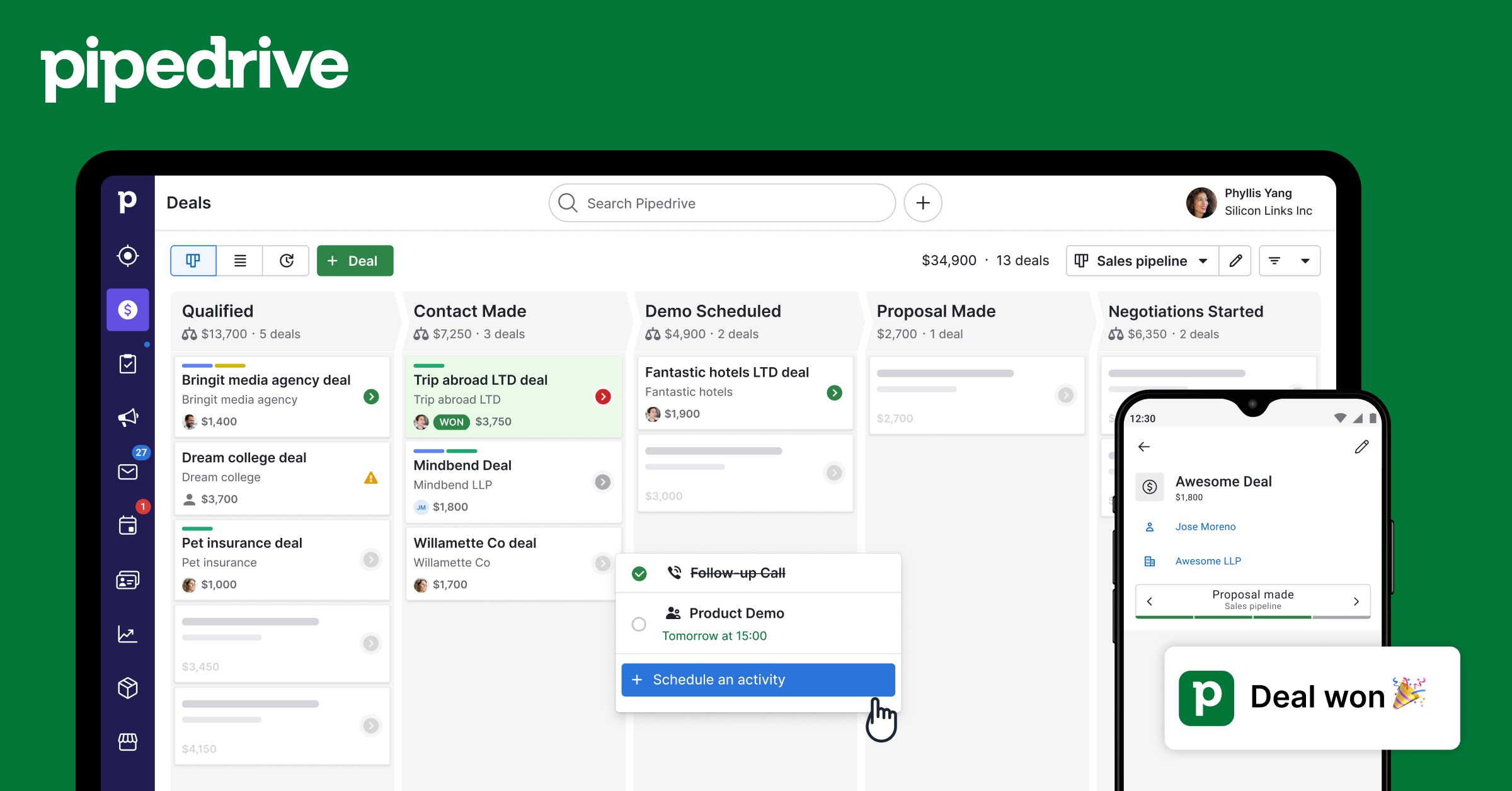
Its defining feature is the kanban-style pipeline view, where each deal is a card you drag between stages like Contacted, Demo, and Negotiation, with weighted value and rotting-deal alerts visible at a glance.
Beyond the pipeline, the core product covers contact and organization records, two-way email sync for up to five accounts, a built-in calendar and activity scheduler, and meeting links for Google Meet, Zoom, and Teams. Workflow automation handles repetitive steps like assigning leads, sending follow-up emails, and moving deals when a condition is met.
The AI Sales Assistant surfaces which deals are likely to close and flags where a rep is going quiet. Insights gives customizable dashboards for pipeline value, conversion rates, and revenue forecasting.
Pipedrive is made by the company of the same name, founded in Estonia and now owned by Vista Equity Partners. It sits squarely in the SMB and mid-market segment, aimed at sales teams that want to be selling within an hour, not building a CRM for a quarter.
Marketing, project delivery, and lead capture exist, but as separate paid add-ons rather than the core.
How Pipedrive works
Setup is genuinely quick. You pick or import a pipeline, define your stages, import contacts from a spreadsheet or Google, and connect your inbox. Most teams have a working pipeline the same afternoon, which is the single biggest reason reps adopt it instead of quietly reverting to spreadsheets.
Day to day, the app revolves around the pipeline and an activity-based to-do list: Pipedrive constantly asks "what is the next action on this deal?" and will not let a deal sit without one scheduled. You drag cards between stages, log calls and emails inline, and automation runs follow-ups in the background.
The interface is clean and fast, with a left-rail nav for Deals, Contacts, Leads, Insights, and Mail.
Integrations are a strong point: the marketplace has 500+ apps including Slack, Zapier, Xero, Trello, and Mailchimp, plus an open API.
The rough edges show up as you scale: reporting is shallower than HubSpot or Salesforce, some of the most-wanted features like lead capture, email campaigns, and web visitor tracking live behind add-ons, and support on the lower tiers is mostly chat and docs rather than a dedicated contact.
Pipedrive key features
Pipedrive pricing
Pipedrive has four per-seat tiers billed annually: Lite at $14, Growth at $39, Premium at $59 (marked Most Popular), and Ultimate at $79 per seat per month. There is no free plan, but a 14-day trial runs with no credit card. Monthly billing costs noticeably more, so annual saves up to around 42%.
Lite covers the core CRM: pipelines, deals, contacts, and email sync, fine for a solo seller or tiny team. Growth adds deeper automation, email tools, and reporting. Premium is where most teams land, adding project features, better forecasting, and higher limits.
Ultimate piles on top-tier automation, security, and support. The catch is the add-ons: LeadBooster (lead capture, around $32.50 per company/mo), Web Visitors (around $41/mo), Campaigns email marketing, and Projects each cost extra, so a team wanting marketing plus CRM can nearly double its effective bill.
As a real-world figure, budget roughly $40-$70 per seat per month once you include a mid-tier plan and one or two add-ons.
| Plan | Price | Best for |
|---|---|---|
| Lite | $14/seat/mo billed annually | Core pipeline and lead management |
| Growth | $39/seat/mo billed annually | Deeper automation and reporting |
| Premium | $59/seat/mo billed annually | Most popular, adds forecasting and workflows |
| Ultimate | $79/seat/mo billed annually | Advanced security and unlimited controls |
Pipedrive pros and cons
What we like
- Visual pipeline is easy to learn, so reps adopt it with little training
- Affordable, transparent per-seat pricing starting at $14
- Strong workflow automation plus 500+ marketplace integrations
What could be better
- Marketing, lead capture, and campaigns are separate paid add-ons
- Reporting and forecasting are shallower than Salesforce or HubSpot
- No free plan, and lower tiers offer only chat and docs support
Who Pipedrive is for
Pipedrive is a strong fit for SMB and mid-market sales teams whose main job is moving deals through a pipeline: outbound reps, agencies, real estate, and B2B teams of roughly 2 to 50 seats that value fast setup and low admin over deep customization.
If your process is "lead comes in, work it through stages, close or lose," Pipedrive maps to that cleanly and cheaply.
It is a weaker fit in two directions. If you need serious marketing automation, landing pages, and CRM on one bill, HubSpot's free-to-paid ladder is the better home, because bolting Pipedrive's Campaigns and LeadBooster add-ons on top gets expensive fast.
And if you are an enterprise with complex territories, custom objects, and heavy forecasting needs, Salesforce or Zoho's upper tiers give you more room. A very small startup counting every dollar should also look at Zoho's free tier or Nutshell before paying for Pipedrive.
Best Pipedrive alternatives
If Pipedrive is not the right fit, these are the closest options.
| Tool | Best for | Starts at | |
|---|---|---|---|
| Pipedrive | SMB and mid-market sales teams that want a visual pipeline running the same day | $14-$79 per seat/mo billed annually (Lite/Growth/Premium/Ultimate) | Visit → |
| HubSpot | Teams that want CRM plus marketing, sales, and service in one platform | Free CRM | Visit → |
| Zoho CRM | Budget-conscious teams that want deep customization and a wider software suite | Free for up to 3 users | Visit → |
| Salesforce Sales Cloud | Larger or fast-scaling orgs needing custom objects, territories, and forecasting | Starter Suite $25/user/mo | Visit → |
| Close | High-velocity inside sales and startups doing heavy calling and emailing | From $9/user/mo billed annually ($19 monthly) | Visit → |
| Nutshell | Small B2B teams wanting an affordable, easy CRM with built-in email marketing | $13-$79/user/mo billed monthly, less on annual billing (Foundation to | Visit → |


The bottom line
Pipedrive earns its reputation as one of the easiest sales CRMs to actually roll out. If your team's core need is a clean, visual pipeline that reps will use without a fight, it is a genuinely good buy starting at $14 per seat, and most teams will be happy on Premium around $59.
The honest caveat is that "simple" comes from keeping marketing, lead capture, and campaigns as paid add-ons, so price the full stack before you commit.
Pick something else when your center of gravity shifts. Choose HubSpot if you want CRM and marketing under one roof, Salesforce if you are scaling into enterprise complexity, and Zoho or Nutshell if you want similar sales features for less. For high-volume inside sales built around calling, Close is the sharper tool.
For most growing sales teams that just want to sell, Pipedrive remains a safe, affordable default.
Frequently asked questions
How much does Pipedrive cost?
Is Pipedrive worth it?
Does Pipedrive have a free plan or trial?
What are the best Pipedrive alternatives?
Can Pipedrive handle email marketing and lead generation?
Sources
Prices and plan details come from each vendor's own pricing page, re-checked by the Toolradar pricing tracker.
- Pipedrive pricingchecked Sep 2026
- HubSpot pricingchecked Sep 2026
- Zoho CRM pricingchecked Sep 2026
- Salesforce Sales Cloud pricingchecked Sep 2026
- Close pricingchecked Sep 2026
- Nutshell pricingchecked Sep 2026
Some offers on this page may be paid placements or contain affiliate links.
Get the Techpresso brief
Free daily newsletter, read in 5 minutes.
Subscribe free